5 posts tagged with "AI"

View All Tags

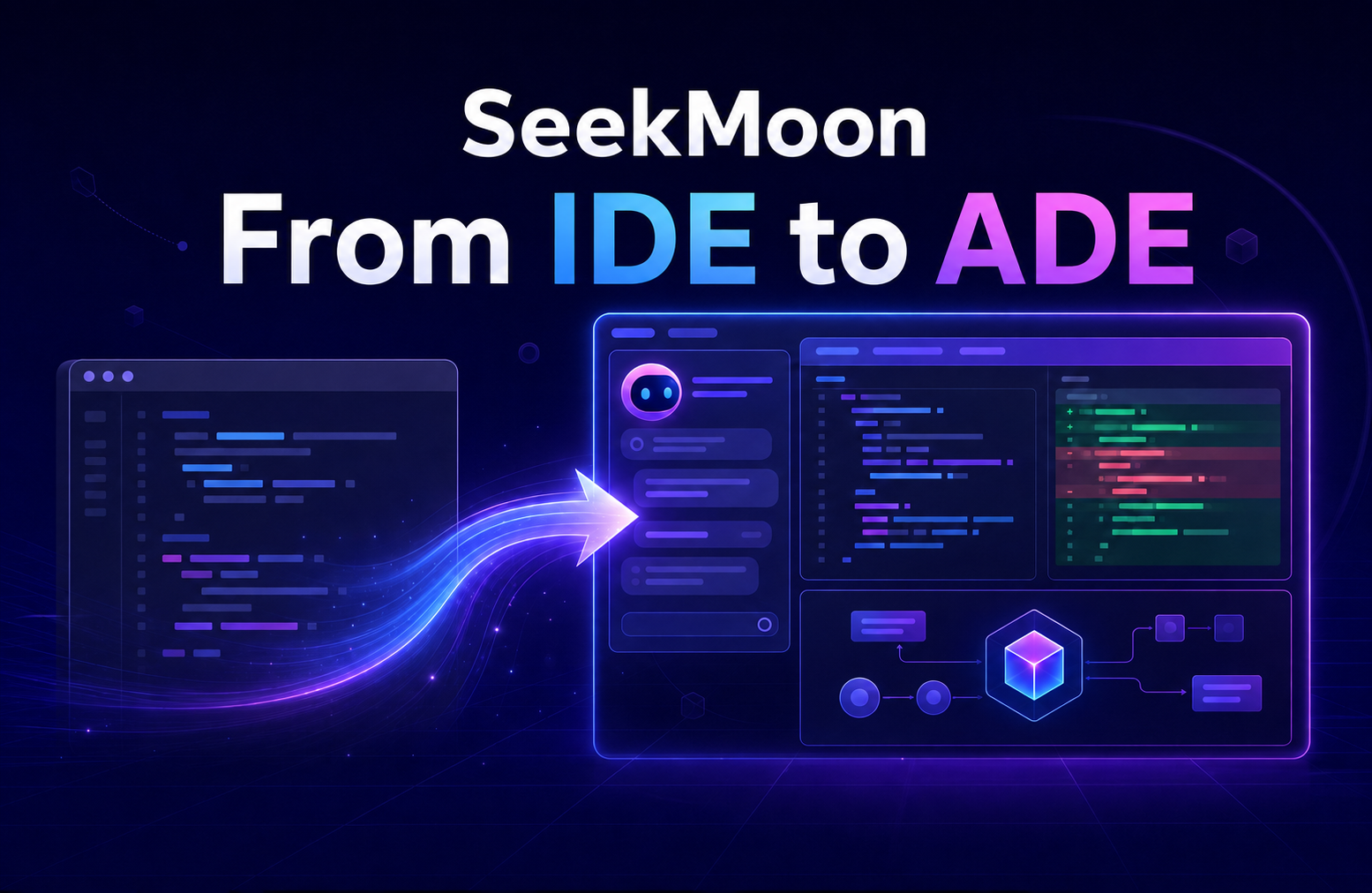
SeekMoon: From IDE to ADE
· 8 min read

Today, coding agents can independently complete complex development tasks, ushering software development into a new era in which agents generate code at scale. As more implementation work is delegated to agents, developers are spending more of their time understanding code, reviewing changes, and making technical decisions. Yet traditional IDEs are still designed around writing code by hand and have not adapted to this new model of collaboration.

In response to this shift, the MoonBit team built SeekMoon, a development environment whose core is implemented in MoonBit. In SeekMoon, the developer defines a goal and an agent makes the concrete code changes. The developer then uses a set of tools purpose-built for agent collaboration to understand the code, review the changes, and decide what should happen next. We call this new kind of development environment an Agent Development Environment, or ADE.

A Workspace Built for Agent Collaboration​

SeekMoon's workspace is organized around an ongoing development task. Once the developer sets a goal, the agent analyzes the code, creates a plan, edits files, and runs validation, with both the process and the results retained in the task context. Alongside the task, the developer can browse the project, search and read files, or open Diff Review at any time to inspect the changes, determine whether they meet expectations, and give the agent further instructions.
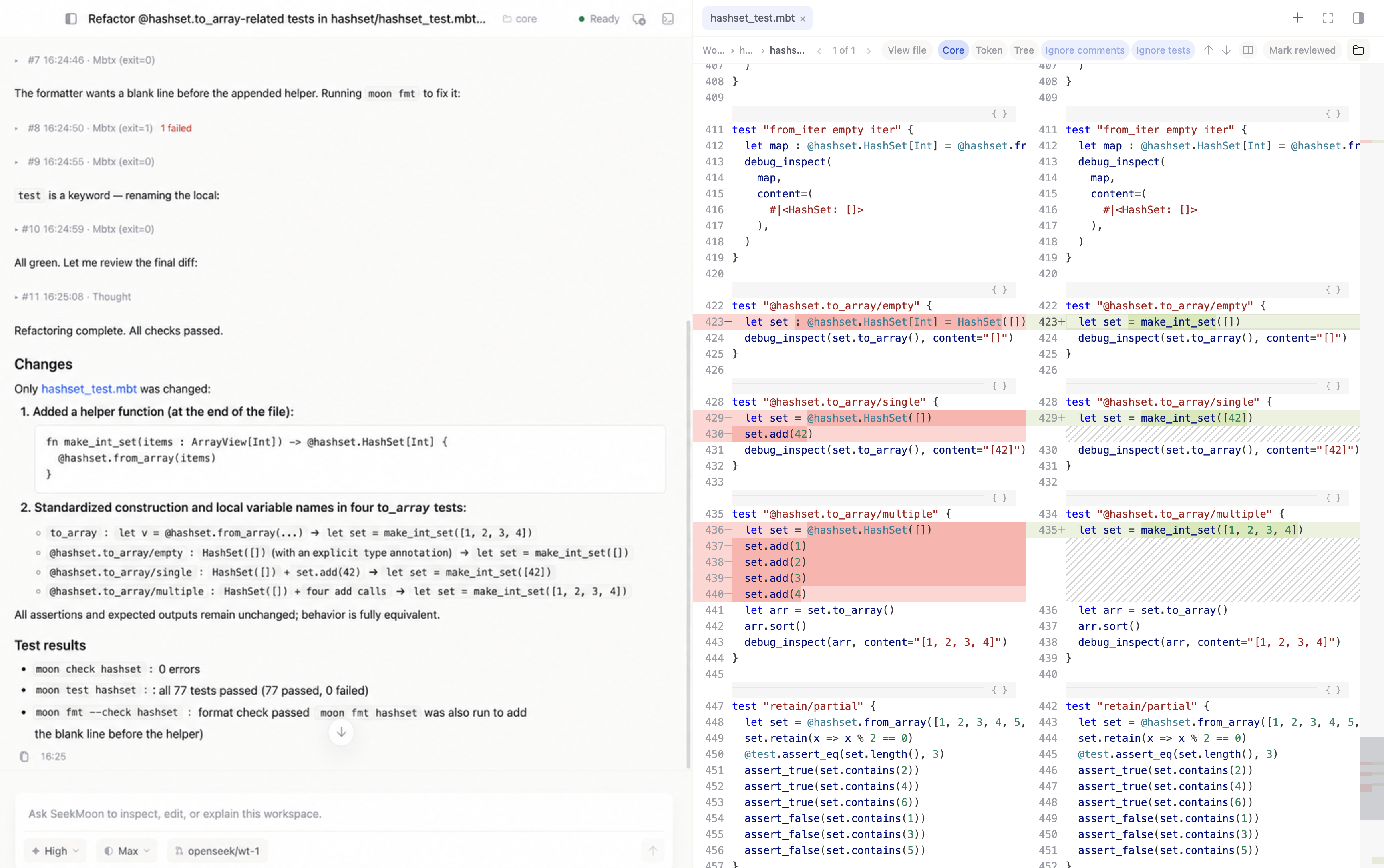
A completed HashSet refactoring task displayed alongside a split-view Diff Review in SeekMoon

Figure: SeekMoon brings agent tasks and code review into a single workspace.

With this division of responsibilities, the development environment's first priority should be helping developers understand the code generated by agents. SeekMoon provides three categories of capabilities for code comprehension and review:

  • Use Token Diff and Syntax Tree Diff to understand changes. In addition to the familiar line-based diff, SeekMoon provides Token Diff and Syntax Tree Diff views while retaining IDE navigation features such as Go to Definition and Find References in the review interface.

  • Use code visualization to understand the big picture. Documentation comments and architecture diagrams can be rendered directly alongside the code. Together with automatic code folding, this lets developers grasp the structure before diving into the implementation.

  • Use syntax-tree search to define the scope of a change. Beyond character-based text search, SeekMoon offers syntax-tree search for MoonBit, and the results can be added directly to the agent's context.

Token and Syntax Tree Diffs: A Clearer View of Code Changes​

To help developers see exactly what changed, SeekMoon provides Token Diff and Syntax Tree Diff for MoonBit. Token Diff compares lexical tokens, de-emphasizing formatting changes such as line breaks and indentation so that substantive edits stand out. Syntax Tree Diff reveals structural relationships in refactorings such as function extraction and variable renaming. Compared with a line-based diff that shows only added and removed lines, these two modes help developers understand changes more directly.

Consider a change made during SeekMoon's own development. After the new argument no_console_window=true was added to @process.collect_stdout("hostname", []), formatting expanded one line of code into five. A line-based diff therefore showed one deleted line and five added lines. Token Diff, by contrast, matched the existing code across line boundaries and highlighted only the new argument and the required comma, making the actual change immediately apparent.
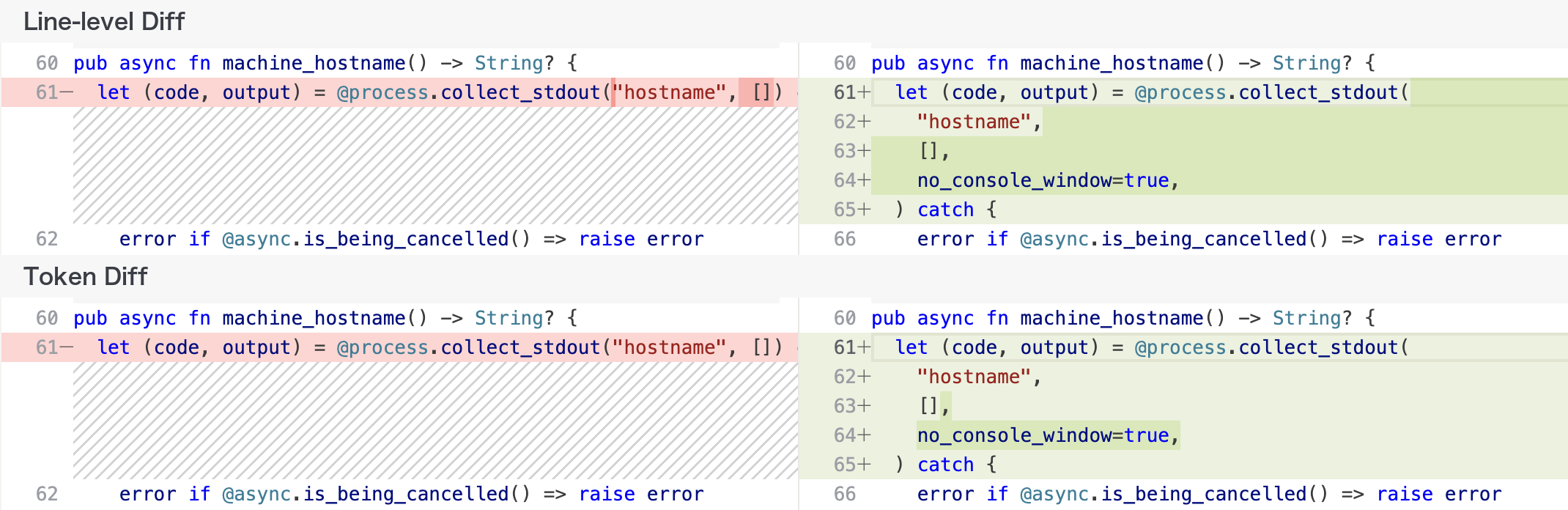
The same collect_stdout change compared in line-level and Token Diff views

Figure: The same change shown in a line-based diff (top) and Token Diff (bottom).

Token Diff is well suited to examining localized edits. Structural changes such as extracting a function, renaming a variable, or rearranging branches require a deeper understanding of how the code was reorganized. Syntax Tree Diff presents differences according to MoonBit's syntax structure, making it better suited to reviewing these kinds of refactorings.

For example, in a HashSet refactoring in the moonbitlang/core project, the set-construction logic was extracted into a helper named make_int_set, a local variable was renamed from map to set, and the assertion style was updated. In a line-based diff, these changes appear together as large blocks of deleted and added lines, leaving the developer to infer how they relate to one another.

In the Syntax Tree Diff view, the differences are organized according to MoonBit's syntax structure, making the extracted function and related edits easier to distinguish. Developers can more clearly see how the code was reorganized and then verify that behavior remains consistent before and after the refactoring.
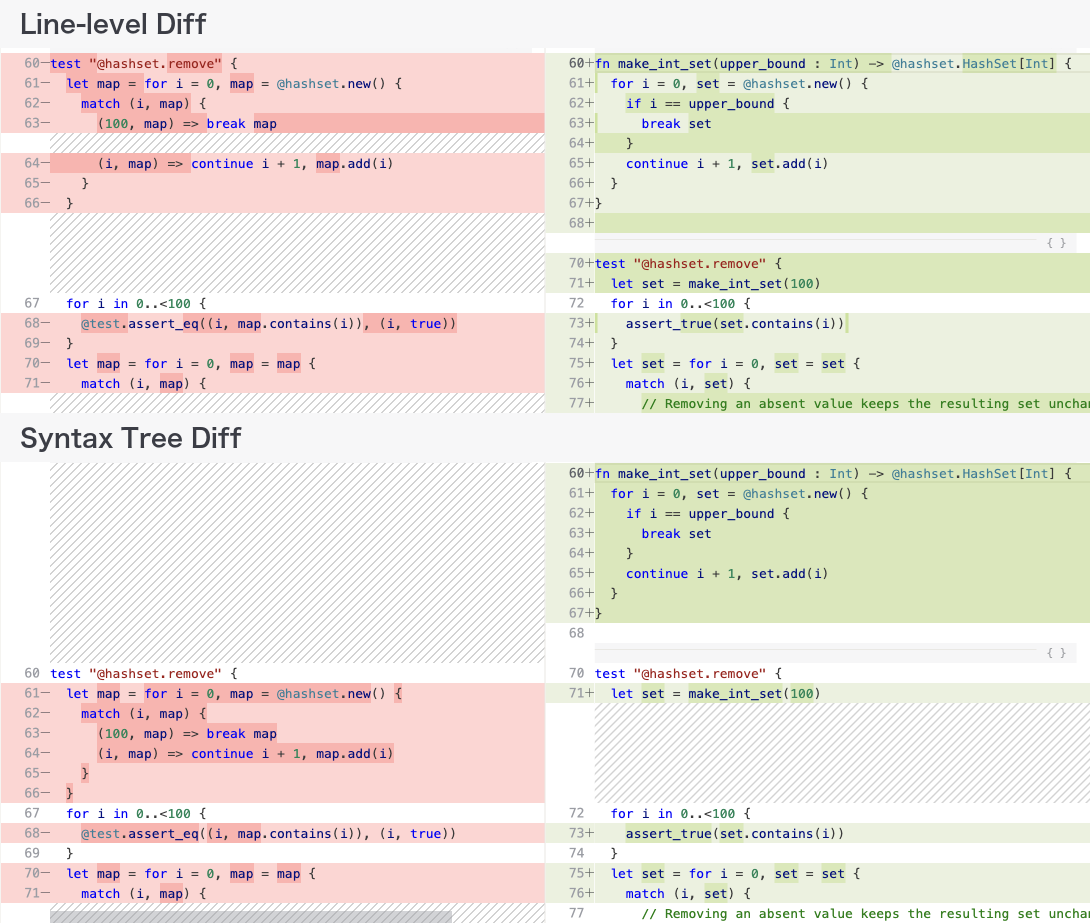
The same HashSet refactoring compared in line-level and Syntax Tree Diff views

Figure: The same HashSet refactoring shown in a line-based diff (top) and Syntax Tree Diff (bottom).

Once the differences are clear, the developer still needs to determine whether the changes are correct and what other code they may affect. SeekMoon retains familiar IDE capabilities in Diff Review, including hover information, Go to Definition, and Find References. In the example below, the developer can open the references list while reviewing the diff and preview related code alongside it, without switching to another view to look up information.
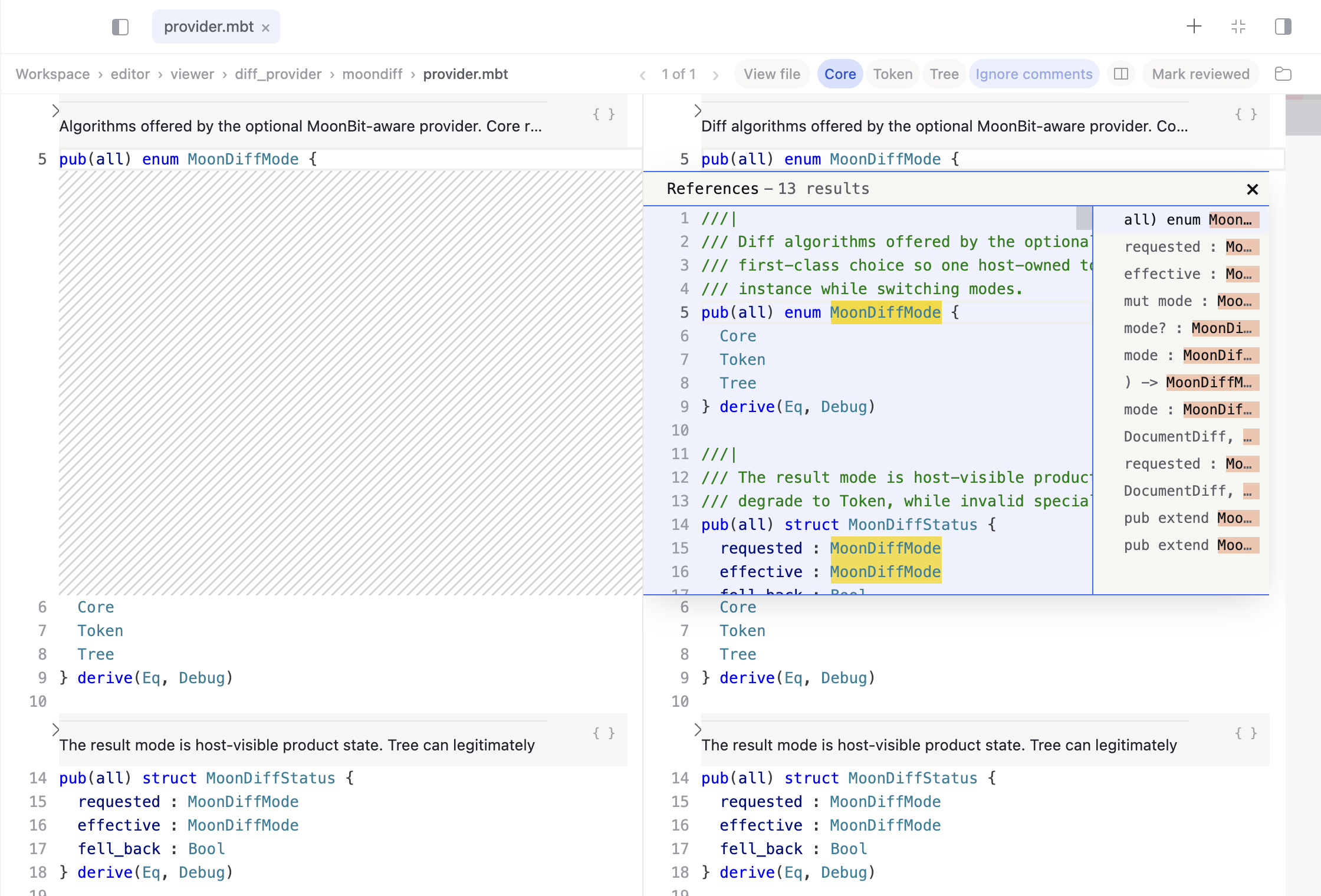
The references list for MoonDiffMode open in SeekMoon Diff Review, with related code previewed

Figure: Finding references and previewing related code in Diff Review.

Code Visualization: Let the Agent Draw the Structure​

When trying to understand code structure, diagrams are often more intuitive than continuous prose. In traditional development, however, creating and maintaining diagrams requires extra effort. As soon as the code changes, diagrams can easily fall out of sync with the implementation, making them difficult to rely on as long-term documentation.

An agent can implement a change and update the accompanying comments within the same task. Because the structural explanation and the code come from the same context, they are easier to keep in sync. In addition to prose, an agent can use diagramming languages such as Mermaid in comments to generate flowcharts and architecture diagrams.

Reading raw Mermaid or D2 source is not intuitive, however. If the development environment displays only the source text, developers still have to switch away from the code view to preview the result elsewhere. SeekMoon renders MoonBit documentation comments directly and displays their diagrams alongside the relevant code, while preserving access to the original comments. Once an agent adds an architecture diagram to a comment, the developer can view it next to the code while reading.

When a regular MoonBit source file is opened for the first time, SeekMoon also folds top-level implementations automatically, prioritizing declarations, documentation, and the overall outline. Developers can first understand the code's structure through its declarations and diagrams, then expand only the implementation details they need to verify.
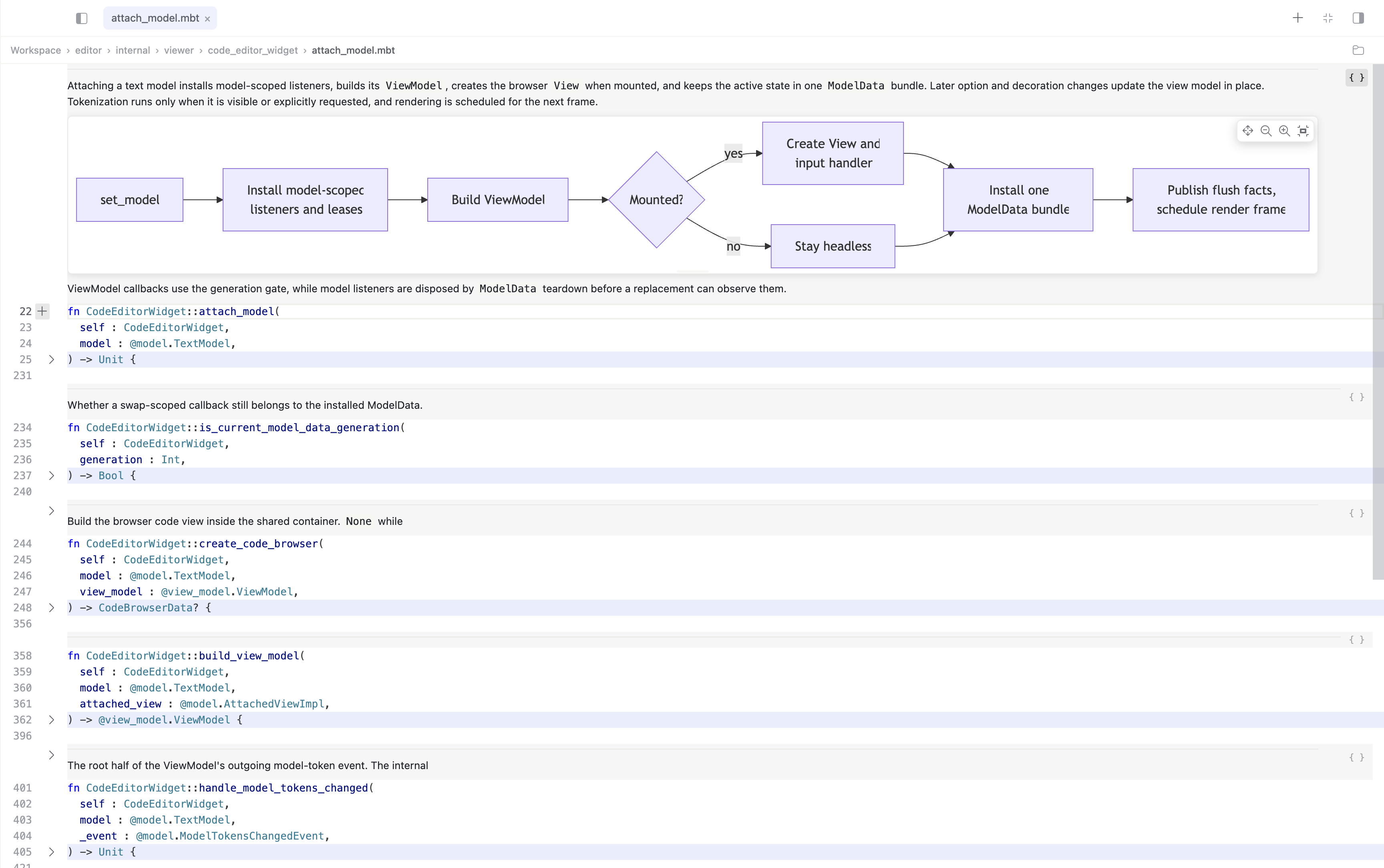
SeekMoon renders an inline Mermaid architecture diagram in a MoonBit source file and folds top-level implementations automatically

Figure: SeekMoon renders documentation and architecture diagrams inline in a MoonBit source file while automatically folding top-level implementations.

From Characters to Syntax Trees: Pass Search Results to the Agent​

In addition to conventional character-based text search, SeekMoon provides syntax-tree search for MoonBit. Developers can find code with the same structure even when the concrete syntax differs.

Consider a test-code refactoring. Some tests in the moonbitlang/core project determine whether a condition holds by comparing a result with true. To find these instances, a developer can run the following syntax-tree search pattern:

@test.assert_eq($(actual:arg), true)

Here, $(actual:arg) is a placeholder that can match different argument expressions. This search found 43 calls with the same structure, and the results list displayed each call together with its surrounding context.
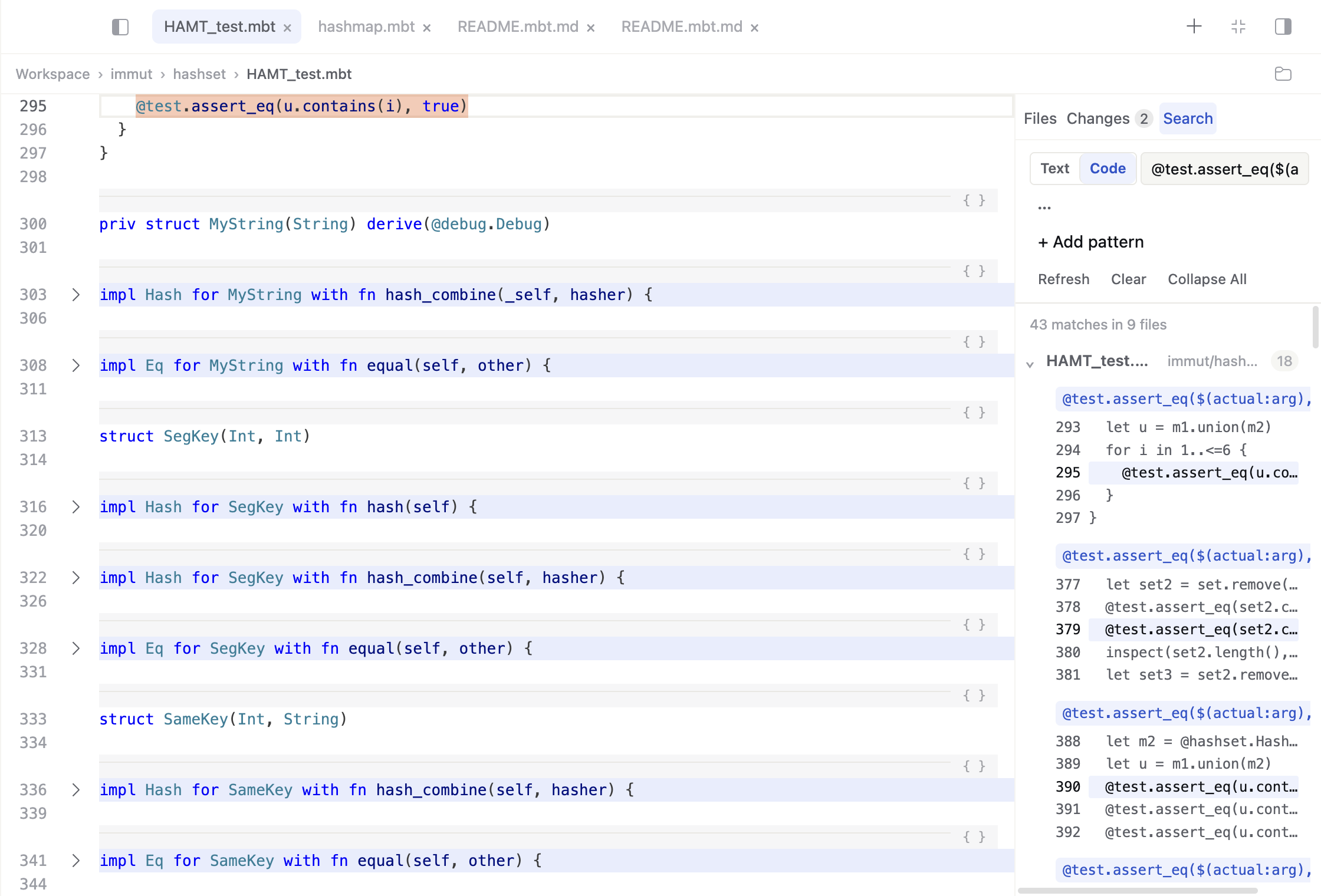
SeekMoon syntax-tree search finds 43 matches across nine files in the core workspace

Figure: Syntax-tree search finds 43 matches across nine files in core.

The developer can then review the results, exclude tests that still need to be preserved, and determine the intended scope of the change. The remaining matches, together with the change request, can be passed to the agent to convert them consistently to assert_true. Once the agent has completed the edits, the developer can inspect them in Diff Review.

Toward ADE​

SeekMoon is not simply adding a few AI features to a traditional IDE. It redesigns the development environment around a new model of collaboration: the agent drives implementation forward, while the developer can understand the result and confidently take ownership of it. That is what an ADE is.

Code produced by an agent is only the starting point. A task is truly complete only when the developer can clearly understand the code and confidently take ownership of it.

SeekMoon is now open source. Visit moonbitlang/openseek to explore the code, build it, and try it for yourself. We also invite you to join us in this exploration as we move the development environment from IDE to ADE.

Local Inference with DeepSeek V4 Flash Using MoonBit

· 7 min read

We recently built a MoonBit native binding for DwarfStar 4 (DS4): tonyfettes/ds4. Through this binding, MoonBit programs can now directly load local GGUF models, create inference sessions, encode chat prompts, sample tokens, and stream the generated output of DeepSeek V4 Flash.

DwarfStar is a compact inference engine by antirez (the creator of Redis), deeply optimized for the DeepSeek V4 model architecture. This means a MoonBit program can run a complete LLM inference loop locally: there is no need to send prompts to a remote API, nor to wrap model capabilities in another external service. The model file lives locally, inference happens locally, and the application-layer control flow runs right inside MoonBit.

From Chat API to Token Stream and Tool Call​

Many users are familiar with chat or coding assistant applications like ChatGPT, Codex, and Claude Code: you type a message, and the model streams its output while thinking; sometimes the model also requests to read a file, run a command, or invoke a tool.

From an application developer's perspective, this usually manifests as an API call: send messages, a system prompt, tool definitions, and sampling parameters to a model service, then receive a stream of events from the server. Different platforms call this interface chat completion, responses, messages, or other names, but underneath they all boil down to the same process: converting the conversation into a token sequence, then having the model generate one token at a time.

A typical flow goes roughly like this:

  1. The application organizes user input, system instructions, history messages, and tool descriptions into the prompt the model expects.

  2. The tokenizer splits the prompt into token IDs, including both ordinary text tokens and model-specific special tokens.

  3. The inference engine feeds these tokens into the model and obtains a probability distribution over "what the next token should be."

  4. The sampler selects a token based on parameters such as temperature and top-p.

  5. This token is decoded into a text fragment and sent to the client as a stream delta.

  6. The newly generated token is fed back into the model to continue predicting the next token.

  7. This loop continues until an end-of-sequence token, a stop sequence, or an explicit stop from the application.

So, the "streaming output" seen in an API is essentially a wrapper around autoregressive inference. The model does not spit out a complete answer all at once; it keeps predicting the next token. The API service then wraps these tokens into an event stream that is more convenient for applications to consume.

Different models have different chat templates. When DS4 loads a GGUF vocabulary, it identifies a set of special tokens, for example:

  • <|begin▁of▁sentence|>: start of conversation.
  • <|User|>: what follows is a user message.
  • <|Assistant|>: what follows is an assistant reply.
  • <think> / </think>: controls or marks thinking content.
  • <|end▁of▁sentence|>: end of generation.
  • |DSML|: part of the DeepSeek tool-call markup.

Suppose the user input is:

Write a short haiku about MoonBit

In DS4, when constructing the prompt to feed the model, the raw sentence is not handed to the model as-is. Instead, it gets turned into something like:

<|begin▁of▁sentence|>
You are a helpful assistant
<|User|>
Write a short haiku about MoonBit
<|Assistant|>
<think>

Here, <|begin▁of▁sentence|>, <|User|>, <|Assistant|>, and <think> are special tokens in the vocabulary and are directly mapped to corresponding token IDs; ordinary text is split into multiple tokens by the BPE tokenizer. If thinking mode is disabled, DS4 places </think> after the assistant prefix, effectively telling the model to enter the answering phase directly.

Tool calls follow a similar idea. The model does not actually execute tools — it only generates structured intents; the host program always performs the actual tool execution. DeepSeek V4's tool-call format is not arbitrary text. DS4 locates the special token |DSML| and renders the DSML tool-call text around it, for example:

<|DSML|tool_calls>
<|DSML|invoke name="read_file">
<|DSML|parameter name="path" string="true">README.md</|DSML|parameter>
</|DSML|invoke>
</|DSML|tool_calls>

There are two layers to distinguish here: |DSML| itself is a special token in the vocabulary; however, the full tags <|DSML|tool_calls>, <|DSML|invoke ...>, and <|DSML|parameter ...> are not each separate special tokens — they are a DSML text protocol composed of ordinary characters together with the |DSML| special token. After the model generates this text, the server or host program parses it into OpenAI/Anthropic-style tool-call events.

If the model is running remotely, the API service typically handles these details for the application. If the model runs locally, the host program needs to control the token stream itself, parse tool calls, execute tools, and update the context. MoonBit plays exactly this host-program role here.

Building a Local Agent with MoonBit​

The repository contains cmd/ds4mbt, a MoonBit coding micro-agent. It builds on the same DS4 binding layer, connecting local DeepSeek V4 Flash inference to a simple tool-calling loop.

The basic loop of cmd/ds4mbt can be summarized as:

  1. Write the user task, working directory, and tool descriptions into the transcript.

  2. Call the DS4 binding to generate one round of assistant response.

  3. Parse read, write, edit, and bash invocations from the <|DSML|tool_calls> block in the response.

  4. Execute those tools inside MoonBit.

  5. Append observations back to the transcript.

  6. Continue the next round of inference until the model stops emitting tool calls.

It defines four tools in the system prompt and asks the model to output tool calls in DSML:

<|DSML|tool_calls>
<|DSML|invoke name="read">
<|DSML|parameter name="path" string="true">relative/path</|DSML|parameter>
</|DSML|invoke>
<|DSML|invoke name="bash">
<|DSML|parameter name="command" string="true">moon check --target native</|DSML|parameter>
</|DSML|invoke>
</|DSML|tool_calls>

The MoonBit side is responsible for parsing this DSML block, converting invocations into internal tool calls, and then executing file reads, writes, edits, or shell commands. Tool results are written back into the transcript as observations and become part of the model's context in the next inference round.

This structure closely mirrors how coding assistants operate. The model does not directly touch the file system, nor does it directly run commands; it only generates tool intents. The MoonBit program turns those intents into real operations and feeds the results back to the model.

To use it, first build the command:

moon build cmd/ds4mbt --target native

Then let the local model execute a workspace task:

moon run cmd/ds4mbt --target native -- \
  --model /path/to/model.gguf \
  --cwd /path/to/project \
  --prompt "Read the MoonBit package and explain the main entry point."

This is only a micro-agent, but it demonstrates the critical path: MoonBit can locally control the token stream, chat template, session state, and tool-call loop. Model inference is the job of the DS4 runtime; application orchestration is the job of MoonBit.

Outlook​

tonyfettes/ds4 is still an early binding, and there are many areas worth further polishing.

First is a higher-level chat / agent API. The current interface is already sufficient to power a CLI and a micro-agent, but it can be further refined into a more stable library surface — for example, message abstraction, streaming callbacks, stop conditions, error types, and long-running session management.

Second is a local OpenAI/Anthropic-style interface. Since remote APIs can organize model output into token streams, message deltas, and tool-call events, a local runtime can provide similar abstractions. In the future, the MoonBit side could expose APIs closer to these application models, making it easier to swap a remote model service for a local one.

Third is a more complete agent runtime, or integration with existing agent frameworks. cmd/ds4mbt is currently a micro-agent; future directions include exploring permission control, tool isolation, parallel tool calls, resumable transcripts, structured logging, and more robust tool parsing.

Once DeepSeek V4 Flash can run locally inside a MoonBit program, the focus is no longer just "calling a C runtime." It is about MoonBit becoming the control layer for local model applications: organizing token streams, managing context, parsing tool calls, executing tools, and composing these capabilities into its own toolchain and applications.

MoonBit 0.9: Introducing First-Class Formal Verification

· 8 min read

As code generation accelerates, the central problem in software engineering becomes harder to ignore: how do we ensure that AI can generate large amounts of code while still keeping that code reliable and constrained by the properties it is supposed to satisfy?

Recently, the tech press reported on an AI-generated hosted application that looked complete on the surface, but contained serious flaws in authentication, access control, and database permissions. The result was a leak affecting tens of thousands of user records.

Related report: The Register coverage

The core issue exposed by this case is that an application can appear to work while the constraints that actually determine whether the system is trustworthy are neither clearly expressed nor systematically verified.

Testing and fuzzing still matter, but both depend on samples and coverage. They are not well suited to answering the stronger question: does the program always satisfy a critical property? On their own, they are still not enough to eliminate this class of problem at the root.

Formal proof offers a clearer path forward. Instead of approximating correctness through repeated testing, we can directly describe the properties a program must satisfy and automatically check whether the implementation really satisfies them. More importantly, as long as the underlying assumptions are sound, the proof process itself can also be generated at scale by AI.

One of the core advances in MoonBit 0.9 is a complete set of formal proof capabilities built for AI collaboration. It helps AI automatically construct nontrivial proofs, generate specifications, and verify whether implementations satisfy those specifications, providing a foundation for large-scale generation of high-quality, verifiable code. This is also the first breakthrough of its kind in this area.

Building a C Compiler from Scratch with AI-Driven Development

· 3 min read

Recently, we completed Fastcc, a self-hosting C compiler built from scratch. The project was carried out with minimal human involvement and targets the ARM64 architecture.

Github Repo: https://github.com/moonbit-community/fastcc

We set a deliberately ambitious goal: to start from zero and build a C compiler, while keeping human involvement as limited as possible.

The initial motivation was to understand how current AI systems behave when tasked with a large, end-to-end software project.

Traditionally, building a full C compiler is considered a complex engineering task. It involves multiple stages — lexical analysis, parsing, semantic checks, optimization passes, and code generation — and typically requires deep domain knowledge and months (or even years) of focused work.

Initial Setup​

The process began with a single voice instruction to the AI agent: “Build a C compiler from scratch, close to tcc, targeting ARM64.”

The project was named Fastcc.

We chose tcc (Tiny C Compiler) as a reference because of its fast compilation speed, which is particularly important for MoonBit’s development workflow. MoonBit’s Native backend supports both LLVM and C, and having a dedicated C compiler enables full self-hosting.

At the same time, tcc is unsafe, poorly maintained, and leaves room for architectural improvements. To keep the scope focused, we limited the target to ARM64.

Self-Hosting and Verification​

By day seven, Fastcc reached a key milestone: self-hosting.

Here, “self-hosting” means Fastcc was able to compile the C output generated from its own source and run its test suite:

  1. Use the MoonBit toolchain to build the Fastcc project (Fastcc.mbt) into an initial compiler executable (Fastcc.exe).
  2. Use the MoonBit toolchain to compile the same source into C (via the Native backend’s C output), producing C files for Fastcc.
  3. Use Fastcc.exe to compile that generated C output into a second executable (Fastcc1.exe).
  4. Verify that Fastcc1.exe passes Fastcc’s own tests.

Fastcc could also compile the tcc source code at this stage. For performance testing we used v.c, a single-file snapshot of the V compiler.

In early benchmarks, Fastcc was about 60× slower than tcc on this input. After subsequent profiling and targeted optimizations, the compilation throughput improved substantially, reaching around 4× faster than clang -O0 on the same benchmark.

Autonomous Workflow and Design Decisions​

Throughout most of the development process, the AI agent decomposed and implemented tasks autonomously. Its work included:

  • Designing the abstract syntax tree (AST)

  • Generating core compiler modules

  • Implementing multiple optimization passes

  • Debugging using lldb as part of its own investigation

  • Profiling performance hotspots using Xcode command-line tools, based on high-level guidance

  • Writing scripts to identify hot paths and guide targeted optimizations

Although the initial directive referenced tcc’s structure, the agent chose a multi-pass design rather than a single-pass model, prioritizing correctness and extensibility over strict structural similarity.

Human involvement was limited to occasional guidance and corrective direction, mainly at the level of goals and evaluation rather than step-by-step instruction.

Outcome​

By day ten, I rarely touched the keyboard.Throughout the process, the agent operated like a tireless engineering team inside the MoonBit ecosystem.

After 10 days, it produced:

  • A working C compiler implementing core language features
  • ~35,000 lines of readable, structured code

Conclusion​

It’s worth noting that this outcome was not accidental. It was made possible by MoonBit’s toolchain and language design, which together enable sustained, large-scale, agent-driven software development.